Bigtable
Bigtable: A distributed storage system for structured data
First, to be clear: Bigtable is a distributed storage system for managing structured data.
Introduction Link to heading
Bigtable’s goal is to scale to massive data sizes. It also has a wide range of applications, from throughput-oriented batch processing jobs to latency-sensitive user-facing services.
Bigtable does not provide a full relational data model. Instead, it offers a simpler data model that supports dynamic control over data layout and format, allowing clients to reason about the locality properties of their data.
Data is indexed by row and column names.
Bigtable treats data as uninterpreted strings.
Users can control the locality of their data via schemas they define. Bigtable also lets clients control whether their data is served from disk or main memory.
Data Model Link to heading
Bigtable is a sparse, distributed, persistent, multi-dimensional sorted map.
The map is indexed by a row key, a column key, and a timestamp. The value is an uninterpreted array of bytes.

A concrete example is storing web pages and related information.
Use the URL as the row key, various other pieces of information as column keys, and store the page content in content. content is a column with timestamps.
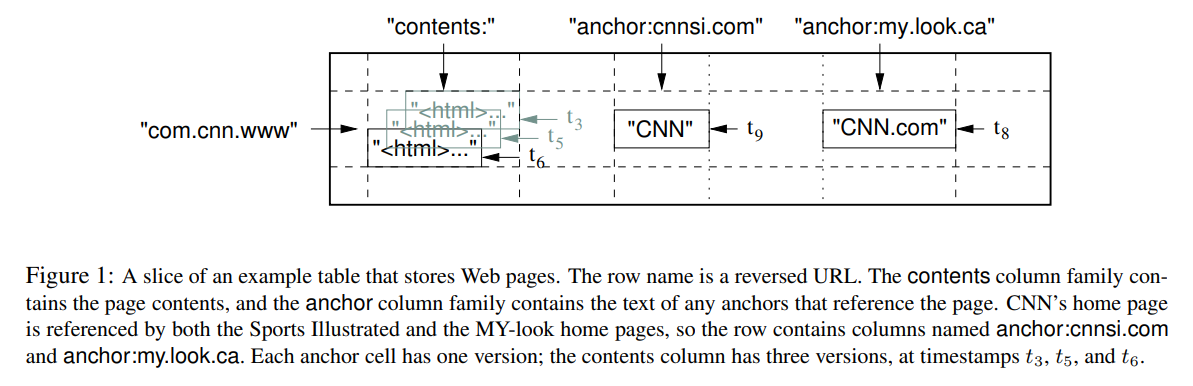
We’ll explain this figure shortly.
Rows Link to heading
A row key is also an arbitrary string. Each read or write of a single row is atomic.
Rows in Bigtable are sorted in lexicographic order and are automatically partitioned. Each row range is called a tablet, the unit of distribution and load balancing.
Reads of a small range of rows usually only require communication with a small number of machines, so they’re efficient. Users can exploit this property to improve data access locality.
Column Families Link to heading
Column keys are grouped into sets called column families. A column family is the basic unit of access control. Data within a column family is usually of the same type.
Disk and memory accounting are done at the column-family level. This means we can specify whether a particular column family is served from disk or memory.
Timestamp Link to heading
Each cell in Bigtable can store multiple versions of data, indexed by timestamp.
Bigtable allows garbage collection via column-family-level settings, e.g., keep only the latest n versions, or only data from the last few days.
With this in mind, the earlier example becomes clearer.
There are two column families: content and anchor.
The content value has three versions.
The anchor family has two columns: anchor:cnnsi.com and anchor:my.look.ca.
That said, the data model isn’t really the key part of Bigtable — it’s fine to think of it simply as a kv-storage.
API Link to heading
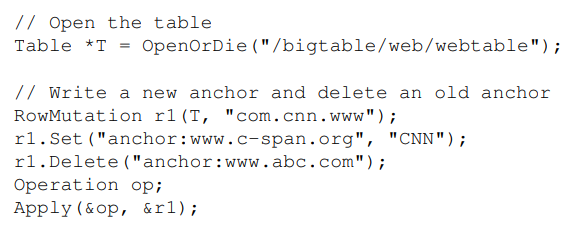
An example of modifying Bigtable.
Open the corresponding table, then use RowMutation to find the target row.
Add an element to the anchor column family, and delete another anchor.
Apply performs an atomic mutation against Webtable.
I’d guess that operations on the same column family are atomic.
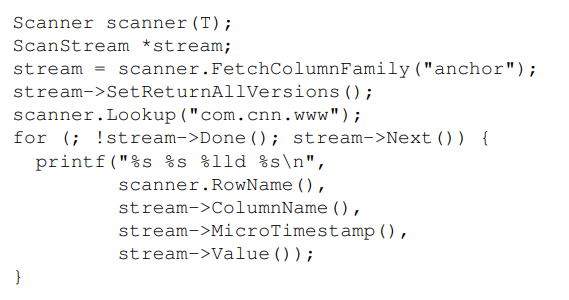
Use a scanner to scan all anchors in a row.
We can also add conditions to restrict by anchor, timestamp, row, etc., to get exactly the content we want.
Bigtable provides single-row transactions.
So we can think of Bigtable as a simplified database, or a slightly fancier kv-storage. The row key acts as the primary key, while the rest acts like extra schema stored in the kv to help organize the data.
Building Blocks Link to heading
Bigtable uses GFS to store logs and data files. It also relies on a cluster management system to schedule jobs, manage resources, handle machine failure, and monitor machine status. (This is presumably Borg, today’s Kubernetes.)
It uses SSTable files to store Bigtable data. SSTables provide a persistent, immutable map.
Each SSTable stores a sequence of blocks (64KB, configurable). We index these blocks via a block index. When an SSTable is opened, the index is loaded into main memory. To find data, we binary-search the in-memory index, then read the corresponding block from disk.
This way, reads don’t require reading the entire SSTable — only the relevant block, identified by the index. Later we’ll see that blocks are also compressed independently, which decouples block reads.
Bigtable also depends on a highly available distributed lock service called Chubby. Chubby uses Paxos to ensure replica consistency. Chubby provides a namespace where each file can act as a lock; reads and writes to these files are atomic.
Each Chubby client maintains a session with Chubby. If a client fails to renew its session lease, the session expires and it loses any locks it held.
Bigtable uses Chubby for several tasks:
- Ensuring there is at most one active master at any time.
- Discovering tablet servers and handling tablet server churn.
- Storing Bigtable schemas (column family info per table) and access control lists.
Implementation Link to heading
Bigtable has three components:
- A library linked into clients.
- One master server.
- Many tablet servers.
The master assigns tablets to tablet servers, detects added or removed tablet servers, balances tablet-server load, garbage-collects files in GFS (e.g., deleted tablets in GFS), and handles schema changes such as table creation or column family modification.
Each tablet server manages a set of tablets. It handles read and write requests on those tablets and splits tablets that grow too large.
As with GFS, client data does not flow through the master. Clients communicate directly with tablet servers, and Bigtable clients do not rely on the master to locate tablets — so most clients never talk to the master.
Tablet Location Link to heading
A B+-tree-like hierarchical structure stores tablet location info.
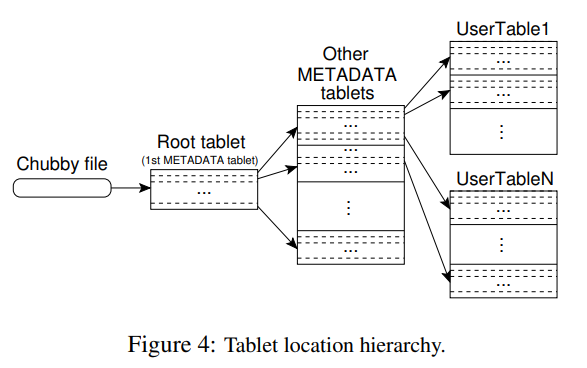
Chubby stores the location of the root tablet.
The METADATA table stores the locations of all tablets. Each METADATA tablet stores a portion of the tablet locations. The root tablet is the first tablet of the METADATA table, but it never splits — that bounds the hierarchy to three levels.
In the figure, the root tablet stores locations of other METADATA tablets, which in turn store locations of data tablets.
Rows in the METADATA table are also kv: the value is the tablet location, and the key encodes the tablet’s last row plus its identifier.
The client library caches tablet locations.
With a cold cache, locating a tablet costs three round-trips.
If the cache is stale, it costs six — each of the three lookups takes a cache miss to walk up.
These tablet records live in main memory, so no extra GFS access is needed. We can also prefetch tablet locations to amortize the lookup cost.
The METADATA table also stores extra logs of events, e.g., when a server began serving a particular tablet — useful for debugging and performance analysis.
Tablet Assignment Link to heading
The master tracks which tablet servers exist and how tablets are assigned. If a tablet is unassigned, the master finds a tablet server with sufficient room and sends a tablet load request.
Bigtable uses Chubby to track tablet servers. When a tablet server starts, it creates a uniquely-named file in a designated Chubby directory and acquires the lock on it.
The master watches that directory to track tablet servers. If a tablet server fails, it loses its Chubby lock. Under network partitions, a live server might lose its session and try to reacquire the lock; if its file has been deleted, the tablet server kills itself, since it can no longer reacquire the lock.
When a tablet server stops serving, the master must reassign its tablets. The master periodically queries each tablet server (rather than Chubby) for status. When a tablet server reports a lost lock, or the master can’t reach it, the master tries to acquire that server’s lock from Chubby itself. If it succeeds, Chubby is alive, so the master deletes the server’s file (preventing it from serving again) and moves the affected tablets back to the unassigned pool.
If the master’s own session with Chubby expires, the master kills itself. (Presumably so a fresh master can start. Otherwise, if a tablet server fails while the master is also dead, those tablets stay unassigned.)
When a master starts, it must learn which tablets are assigned. The steps are:
- Acquire the master lock in Chubby.
- Scan the Chubby server directory to find live tablet servers.
- Talk to each one to learn what tablets they currently hold.
- Scan the METADATA table; record any tablets it finds that aren’t already assigned.
Note: step 4 won’t work if the METADATA table itself isn’t yet assigned. So the master also tracks whether the root tablet has been assigned.
One more thing: tablet splits are initiated by tablet servers. The tablet server commits a split by recording the new tablet info in the METADATA table, then notifies the master. If either the master or the tablet server fails, the notification can be lost. Later, when the original tablet is reassigned to another server, the master tells the new server to load it; the new server then notices the data has already been split (e.g., by examining the row range) and informs the master.
Tablet Serving Link to heading
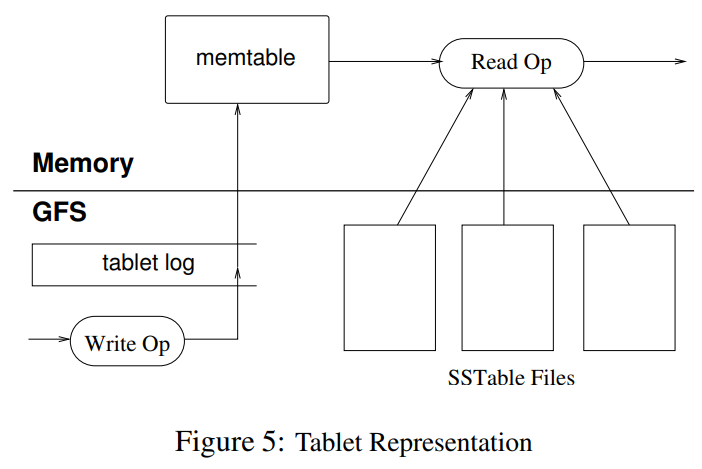
For mutations, we go through a commit log. Recent committed mutations live in main memory in a structure called the memtable. Older mutations live in SSTables.
To reconstruct a tablet, the METADATA table records a list of SSTables for it, along with a set of redo points. The server reads the SSTable indexes into memory (for later lookups) and replays log entries past the redo points to rebuild the memtable.
When a write reaches a tablet server, the server first checks that the write is well-formed and that the sender has permission. (Permissions come from a Chubby file storing the writer ACL.)
A valid mutation gets written to the commit log. Group commit improves throughput on lots of small mutations. After the log entry commits, the mutation is applied to the memtable.
For reads, the server again checks format and permission. The read runs over the memtable and a sequence of SSTables. Since SSTables and the memtable are sorted, lookups are efficient.
Because SSTables are sorted, splits and merges don’t disturb normal reads and writes.
Compactions Link to heading
The memtable grows as writes accumulate. Once it crosses a size threshold, the existing memtable is frozen, a new one is created, and the frozen memtable is converted into an SSTable and flushed to GFS.
This is called minor compaction, which gives two benefits:
- Reduces memory usage.
- Reduces redo log replay during recovery.
But unbounded SSTables would force reads to consult many of them. So Bigtable runs periodic background merging compactions that read several SSTables (and possibly the memtable) and produce a single new SSTable. The old SSTables and memtable can then be safely deleted.
A major compaction merges all SSTables into one. For some deleted data, the deletion exists only as a tombstone in newer SSTables, with the actual data in older ones; after a major compaction, only one version of any datum survives, and tombstones aren’t needed. Bigtable runs major compactions periodically per tablet, enabling garbage collection. This also makes deletions a periodic operation, providing strong guarantees for sensitive data.
So there are three kinds: minor compaction, merging compaction, and major compaction.
Difference between merging and major? Merging compaction touches only the most recent SSTables, so it’s typically fast — and it must keep tombstones because data could still live in older SSTables. Major compaction processes all SSTables (memtable excluded), so tombstones aren’t needed.
A key point: these operations all happen in the background and are naturally concurrent because the SSTables are immutable. Some databases can’t do this — they have to deal with locking.
Refinements Link to heading
This section describes tweaks to the implementation above for performance and availability.
Locality groups Link to heading
Users can group several column families into a locality group. Each locality group corresponds to its own SSTable. Separating column families that aren’t accessed together yields more efficient reads — fewer GFS reads required.
Users can also configure how a locality group is read, e.g., load it into memory. Then the corresponding SSTable is loaded into the tablet server’s main memory on open, and subsequent reads are fast. This is great for frequent small reads — for instance, the location column family in the METADATA table is configured this way.
Compression Link to heading
Users can decide whether a locality group’s SSTables are compressed. Each SSTable block is compressed independently, so we can read a small block without decompressing the whole SSTable.
The paper uses two-pass compression mainly for speed, but its space ratios are also good. Because data within an SSTable is sorted, similar data ends up adjacent — sliding-window compressors then do very well. Storing multiple versions of a row only improves the ratio further.
My guess is that this also reflects the workload: web pages from the same host share a lot of boilerplate. But the real key is the isolation provided by locality groups, which lets us compress and read independently — getting both space savings and fast reads. This requires the user to specify their access pattern.
Caching for read performance Link to heading
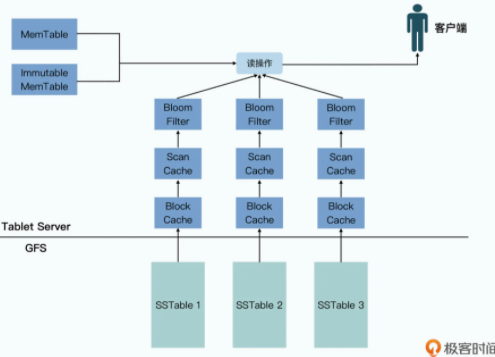
Bigtable has two layers of cache:
- Scan Cache stores key-value pairs, so repeated requests for the same data return immediately.
- Block Cache caches SSTable blocks read from GFS, exploiting access locality.
Bloom filters Link to heading
The read path described above may consult every SSTable to find the latest row. Creating a bloom filter per SSTable lets us quickly determine whether an SSTable could possibly contain a given row. Keeping the bloom filters in memory drastically reduces GFS access.
Commit-log implementation Link to heading
Storing a separate log file per tablet would mean lots of concurrent file writes against GFS. The fix: one commit log per tablet server.
A single log helps performance, but its downside is that when a tablet server fails, its tablets may be redistributed across many other tablet servers.
If the tablets land on 100 machines, we’d see 100 redundant reads of the log, each machine replaying only its own portion.
We avoid this by sorting the log so that entries for the same tablet are adjacent.

The paper mentions two writer threads, which felt a bit odd at first.
After getting some pointers from a friend: the two log threads write two different GFS files, so when one GFS file is unavailable or experiencing network issues, we can continue with the other. This dampens the impact of GFS variability.
Speeding up tablet recovery Link to heading
If the master moves a tablet from one server to another, the source server first does a minor compaction. This shrinks recovery time on the destination. Then the source stops serving the tablet, and before it unloads, it does a second minor compaction — because the first one didn’t pause writes, and new log entries may have accumulated. As a result, when the destination loads the tablet, it needs no log recovery. (The point is to push log recovery into the SSTables, since the shared log would be expensive to re-sort.)
Exploiting immutability Link to heading
Because SSTables are immutable, concurrent reads need no synchronization. Only the memtable is mutable, so we only need simple concurrency control over the memtable to support single-row transactions.
To avoid blocking reads, the memtable uses copy-on-write, allowing concurrent reads and writes (MVCC — and since Bigtable already records multiple versions, MVCC is a natural fit).
SSTable immutability also means deletions become a garbage-collection problem on SSTables. We mark SSTables for GC by removing them from the METADATA table.
Immutable SSTables also make splits cheap: rather than producing a new SSTable per child, children simply share the parent SSTable.
(This sharing trick is elegant: redirect new requests to the appropriate child, whose own memtable and SSTables cover its sub-range, while older data is read from the parent. Compaction will eventually reclaim the parent, but only once both children’s refcounts drop — a refcount is added to keep both alive.)
One subtlety: the two-level cache mentioned earlier sits at the SSTable level, not the tablet level. Because SSTables are immutable, the cache stays valid as long as the SSTable does.
The figure from “Geek Time” makes this nicely:
Performance Link to heading
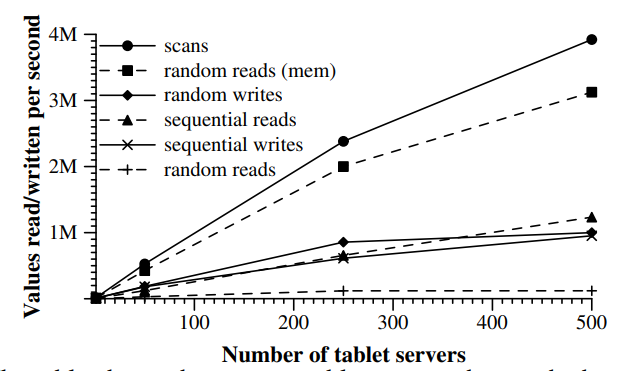
The scaling story is the interesting part of this figure.
A key reason Bigtable doesn’t scale linearly is load balancing — moving tablets around causes brief unavailability.
Random reads have the worst performance, because each read fetches a full block from GFS.
The paper doesn’t elaborate on sequential reads/writes, but I’d guess they’re bottlenecked by GFS.
Lessons Link to heading
Large distributed systems are vulnerable to many kinds of failure, not just network partitions and crashes.
Examples include memory and network corruption, clock skew, hung machines, asymmetric network partitions, and bugs in other systems.
Another lesson: defer adding new features until you clearly understand how they’ll be used.
The most important takeaway is simple designs. Initially, tablet server membership was managed by master leases — when a tablet server’s lease expired, it killed itself. This reduced availability and tightly coupled the system to master recovery time. (This may be why GFS itself was eventually replaced.)
So the responsibility was split out into Chubby. The master only manages tablet assignment; it doesn’t manage tablet server membership.
Finally, there’s a great article that walks through Bigtable’s design via a re-build approach.
The main reason Bigtable uses column families: if Bigtable were just a plain kv-store, with single-row transactions, all you could do is atomically update one value — not enough for most users. So Bigtable extends the row concept: a row holds many kv pairs, and different rows can have different keys. This turns “atomic value operation” into “atomic structure operation.”
So while Bigtable doesn’t support full transactions, it offers a simpler programming model with a useful guarantee — the most direct manifestation being that we can now atomically update many values, not just one.

Comparison with a database.